Module 4 - Fine grained access with NGINX Controller APIm module
In this lab, we will allow access to the Arcadia API, only for Manager Role. To do so, we will first check the JWT token claims and understand how to forward a claim from a provider into the Bearer SSO.
Step 1 - Understand the JWT token claims
In the previous lab, we used 2 tokens:
Partner 1:

eyJ0eXAiOiJKV1QiLCJhbGciOiJIUzI1NiJ9.eyJpc3MiOiJwYXJ0bmVyMSIsImlhdCI6MTU5MzQ1NTk4NSwiZXhwIjoxNjg4MDYzOTg1LCJhdWQiOiJhcGkuYXJjYWRpYS1maW5hbmNlLmlvIiwic3ViIjoiYXBpLmFyY2FkaWEtZmluYW5jZS5pbyIsIkdpdmVuTmFtZSI6IkpvaG5ueSIsIlN1cm5hbWUiOiJSb2NrZXQiLCJFbWFpbCI6Impyb2NrZXRAZXhhbXBsZS5jb20iLCJSb2xlIjoiTWFuYWdlciJ9.JRboDfKWvSLVU3md6OULGifoVxJ-ryx7y-0DKrOlPOM
Partner 2: eyJ0eXAiOiJKV1QiLCJhbGciOiJIUzI1NiJ9.eyJpc3MiOiJwYXJ0bmVyMiIsImlhdCI6MTU5MzQ1NTk4NSwiZXhwIjoxNjg4MDYzOTg1LCJhdWQiOiJhcGkuYXJjYWRpYS1maW5hbmNlLmlvIiwic3ViIjoiYXBpLmFyY2FkaWEtZmluYW5jZS5pbyIsIkdpdmVuTmFtZSI6IkJvYiIsIlN1cm5hbWUiOiJUaGUgU3BvbmdlIiwiRW1haWwiOiJib2JAc3BvbmdlLmNvbSIsIlJvbGUiOiJDb250cmFjdG9yIn0.aqTxd6X4z7EFijJsyiuq8mZAKMLG519Bmjz1ra24L-s
Navigate to https://jwt.io/ and paste
Partner1JWT token into the website. And check the claimRole.Partner 1is a manager.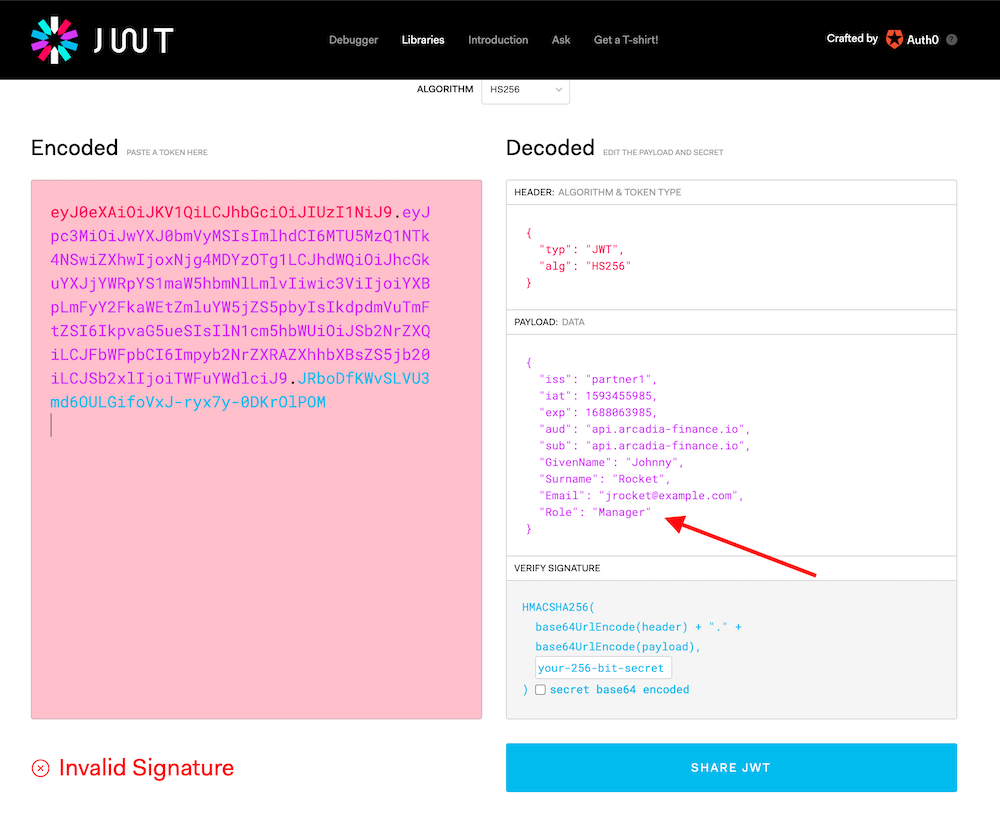
Do the same with Partner2 JWT token.
Partner 2is a contractor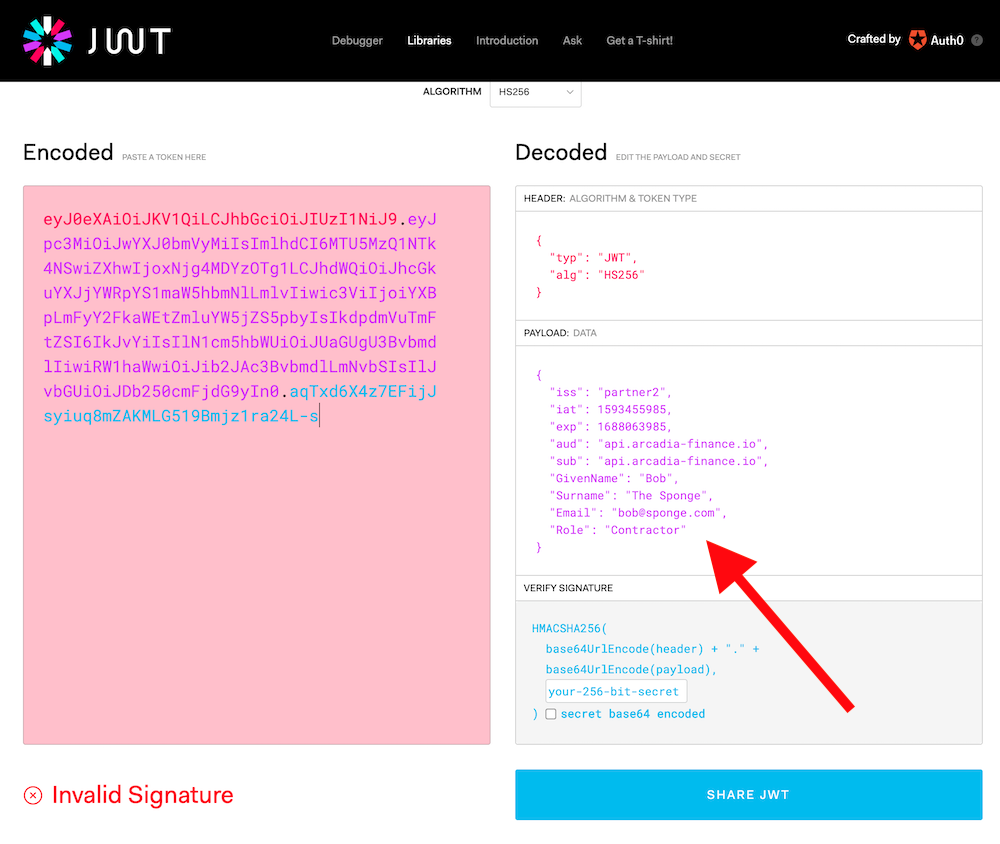
Step 2 - Create a new Claim in APM in order to forward this claim into the Bearer SSO
Note
The providers will inject a Claim into the JWT. This claim is Role. We need to re-inject this claim into the Bearer SSO token so that NGINX GW only accept requests from users belonging to Manager Role.
In the
BIG-IP>Federation>Oauth Authorization Server>ClaimClick
CreateCreate this
ClaimName
Claim_RoleClaim Type
StringClaim Name
RoleClaim Value
%{subsession.oauth.scope.last.jwt.Role}
Click
Save
Step 3 - Modify the Bearer SSO in order to inject this new Claim
Note
Now, it is time to tell to the Bearer SSO profile to inject this claim in the JWT SSO token
In
Single Sign-on>Oauth Bearer>arcadia-api-ssoAdd the previous created
Claiminto theSelectedlistClick
Update

Step 4 - Update the authorization component setting in the controller
Note
Now, the BIG-IP APM is injecting the Claim in the JWT Bearer SSO token. It is time to tell to the NGINX GW, to only grant access if the Role contains Manager
In the controller GUI
In
APIs>arcadia-api-def, edit thepublished APIprod-api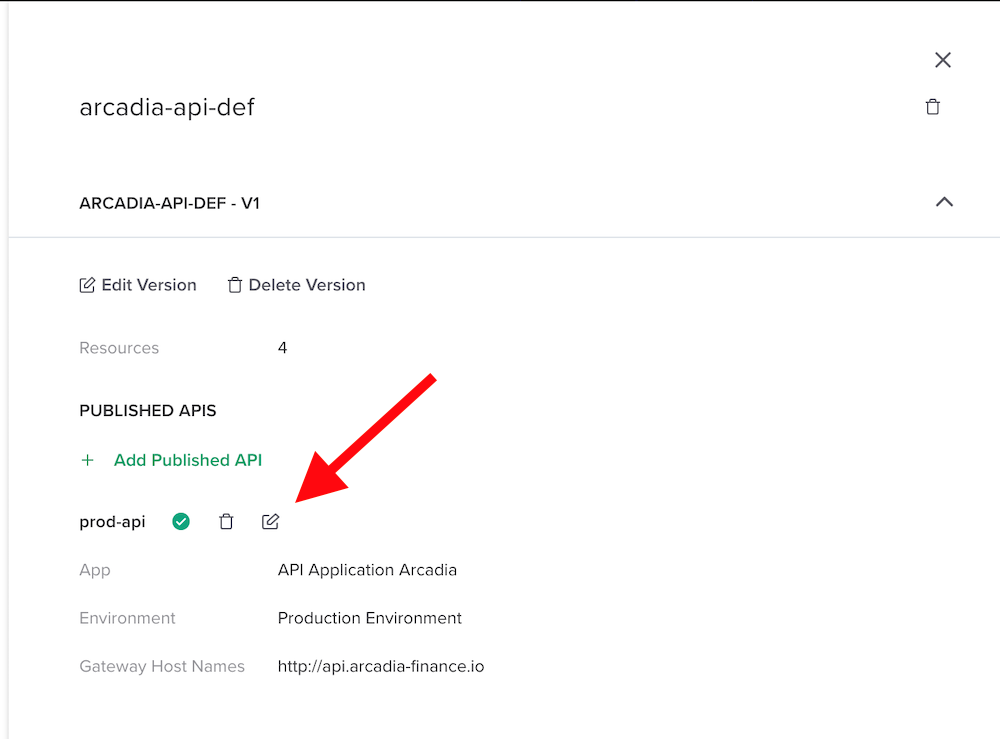
Edit
Authentication
Click on
Enable Conditional AccessAnd enter the values below. This will allow access only if the
ClaimcontainsManager. Select401as Failure Reposonse as403is not allowed as reponse type by Adv. Waf (by default)
Click
SubmitandSubmit
Step 5 - Make a test
In
Postman, send a request withPartner1JWT token. As a reminder, he isManager. Request passes.Partner 1: eyJ0eXAiOiJKV1QiLCJhbGciOiJIUzI1NiJ9.eyJpc3MiOiJwYXJ0bmVyMSIsImlhdCI6MTU5MzQ1NTk4NSwiZXhwIjoxNjg4MDYzOTg1LCJhdWQiOiJhcGkuYXJjYWRpYS1maW5hbmNlLmlvIiwic3ViIjoiYXBpLmFyY2FkaWEtZmluYW5jZS5pbyIsIkdpdmVuTmFtZSI6IkpvaG5ueSIsIlN1cm5hbWUiOiJSb2NrZXQiLCJFbWFpbCI6Impyb2NrZXRAZXhhbXBsZS5jb20iLCJSb2xlIjoiTWFuYWdlciJ9.JRboDfKWvSLVU3md6OULGifoVxJ-ryx7y-0DKrOlPOMThen, send the same request with
Partner2JWT token. As a reminder, he isContractor. Request fails.Partner 2: eyJ0eXAiOiJKV1QiLCJhbGciOiJIUzI1NiJ9.eyJpc3MiOiJwYXJ0bmVyMiIsImlhdCI6MTU5MzQ1NTk4NSwiZXhwIjoxNjg4MDYzOTg1LCJhdWQiOiJhcGkuYXJjYWRpYS1maW5hbmNlLmlvIiwic3ViIjoiYXBpLmFyY2FkaWEtZmluYW5jZS5pbyIsIkdpdmVuTmFtZSI6IkJvYiIsIlN1cm5hbWUiOiJUaGUgU3BvbmdlIiwiRW1haWwiOiJib2JAc3BvbmdlLmNvbSIsIlJvbGUiOiJDb250cmFjdG9yIn0.aqTxd6X4z7EFijJsyiuq8mZAKMLG519Bmjz1ra24L-s
Note
As you can notice, APM is collecting the different claims and only forward the relevant claims to the internal API GW. Then, API GWs grant access based on the claim values.